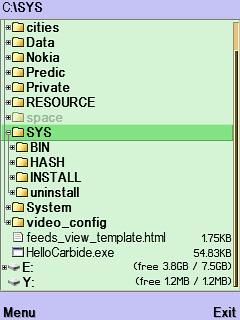
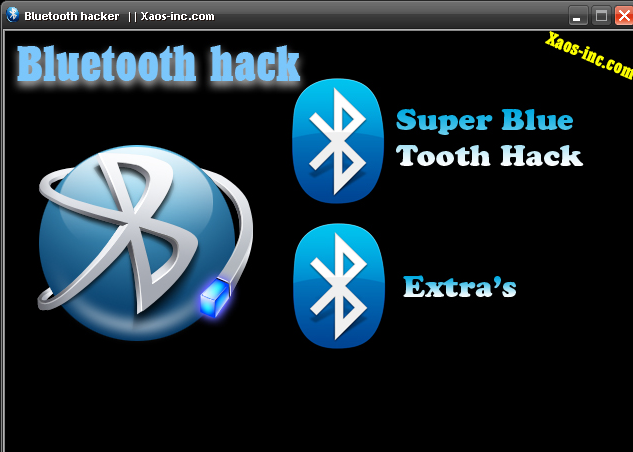
This is the mobile app which allows you to gain access to one's phone via bluetooth without their knowledge. this app allows you to download their messages and phonebook, initiate and end voice calls and even take over and control their phone.
When your phone is connected to other telefononom via BlueTooth you can: - Read his message - show his contacts - Change profile - Listen to his music - Switch off his phone
I brought you news of a way to get certificates despite Stupid Symbian Signed locking you out. Now I bring you a way to not even need to sign applications to use them on your phone!
Thanks to FCA00000 and others in this thread for coming up with this solution! Thanks also go to Neanton for the basic guide!
WHAT DOES THIS HACK ALLOW ME TO DO?
It will allow you to install UNSIGNED applications. It will allow you to give applications FULL permissions. Basically, it will give you FREEDOM.
Download Hack Perms HERE. CLICK THE IMAGES FOR A LARGER SIZE!
Let's get to business:
Connect your phone to your PC via USB in PC Suite mode. Go to Control Panel>System>Hardware>Device Manager>Ports OR in Windows Vista it's Control Panel>Hardware and Sound>Device Manager>Ports. Once you're there, look for your phone, in my case it's called 'Nokia GSM Phone USB (COM3)'. Make a note of the number after COM, you'll need it later.
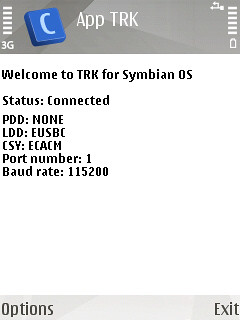
Open AppTRK on your phone and press cancel when it trys to connect via bluetooth. Go to options>settings>connection and change it to USB. Go back and press options then connect. This is what you should see:
Now open up the Hack Perm python file in notepad on your PC, press CTRL+F on your PC and search for "ser =" (Without quotation marks, of course). Once you're there change the 5 that's in the brackets to the 1 less than the number that followed COM in the step above. For example, if your number was 7, you would change the number in the brackets to 6 and if your number was 5, you would change the number in the brackets to 4. Once you've done that, save the python file (JUST SAVE, NOT SAVE AS).
Once you have done this, just double click the Hack Perms file and wait for about 5 seconds, during this time, you should see this, notice the "!!!!!!!!!!!candidate!!!!!!!!!!!", this shows you've been successful:
Now to make the hack computer-free:
Download THIS file and copy the contents to a folder in your phone.
1) Using your file manager of choice copy the CProfDriver_SISX.ldd file into C:\sys\bin. 2) Install CapsOn and then install CapsOff.
That's it! Whenever you want to run the hack just select CapsOff and the hack will be working! No need for a computer! If for some reason you want to turn off the hack just select CapsOn... Yes, it really is THAT EASY. DONE!
There is a hidden menu inside your Nokia phone. If you want to activate it, you'll have to re-program some chips inside of your phone. Check your software version. You can only continue if you have v4.33, v4.73 or v5.24. Take apart the phone. De-solder the EEPROM (ATMEL AT 24C64). Read out the data with an EEPROM programmer and save it to a file (Backup). If you have v.33 or v4.73, change the address "03B8" from "00" to "FF". If you have v5.24 then change the address "0378" from "00" to "FF". Write the new data to the EEPROM and solder it back to the phone, Power on your phone and you should have "Netmonitor" enabled. The Network Monitor gives you the following information. Carrier number MS RX Level in DBM Received signal quality MS TX power level C1 (Path loss criterion, used for cell selection and reselection). The range is -99 to 99. RTL (Radio link timeout). Timeslot Indication of the transmitter status Information on the Network parameters. TMSI (Temporary Mobile Subscriber Identity). Cell identification (Cell ID, Number of cells being used). MCC (Mobile country code) MCN (Mobile network code) LAC (Location area code) Ciphering (On/Off) Hopping (On/Off) DTX (On/Off) Discard cell barred information Read More..
Basically you will need to change your N73’s product code and flash the new firmware to get the new exciting features!
Only firmware 4.07xx.x.x.x supports the new A2DP and the following updates (though it’s these are yet to be officially ) * New Music Player (same as in N73 Music edition) * Camera improvements * FOTA (Firmware updates Over The Air)
and so far only Product Code - 0529835 has the new firmware.
You can use the Nokia Software Updated Availability link to see if your own product code is updated (I’m guessing Nokia will roll this out slowly to the rest of the world)
Step 1 : Change product code on Nokia’s N73 ——
You need the following softwares ;
1. NSS (Nemesis Service Suite) - to change the product code [Get it from http://bphreaks.brinkster.net/files/NSS/NSS103812.zip] - UPDATED
2. GSM-Magic - to help enable features on NSS [Get it from GSM Magic Program]
3. Nokia Software Update - Nokia’s own program to download the firmware and flash your mobile phone [It should come with the latest PC Suite, otherwise -Get it from http://www.nokia.com/A4176089 ]
- Instructions -
1) Connect your phone to computer, and choose PC-Suite mode in your mobile 2) Start NSS 3) Push “Scan for new device” 4) Go to Phone Info screen. Enable the product code box in the right corner. Change the number there to N73 ME product code number 0529835 into that product code box and then click that enable box. (note your original N73 product code up, in case if you need it again).
5) Then click WRITE, and in few seconds click READ, and you’ll see that your phones product code has changed. 6) Then exit NSS and start NSU and follow the steps. 7) Wait for your mobile to update. This will take some time the firmware is about 60mb+ to download.
Step 2 : Update with Nokia Software Update (like usual) ——————————————————–
1. Launch Nokia Software Update and let it run its update!
PS: It’s 67mb worth of downloading. so it’s going to take a while. Make sure your mobile is charged!
The snakes game is somehow missing from the update - So if you miss it, here’s the link to download it back. [Get it from - http://europe.nokia.com/A4323689 ] It’s the N95 page but will work for your newly flashed Nokia N73.
Enjoy your new full featured Nokia N73!
UPDATE! : Now you can skip Step 1! Just update your firmware via the NSU as Nokia as released it for the general public already! Make sure the firmware is 4.07.xxx.xxx
Posted in A2DP, Bluetooth, Nokia N73 1 Comment »
Listening to my music wirelessly (via Bluetooth - Motorola S9)! July 3rd, 2007 by Optimus Here’s the thing, I have always wanted to have a wireless way of listening to music ever since Bluetooth came about.More than a year ago, I got a i-Tech R35 headset that came with the 3rd Gen Ipod connector.. then sometime last year I got a 2nd hand black 4gb Nano to replace my 30gb one. Which I also eventually got the iTech Bluecon connector for it.
Now the Motorola S9 was brought to my attention from my best buddy and since we have been trying to hunt it down in Singapore. Shipping from US was a possibility but we got news that Motorola was giving it out as part of the Z6 phone bundle for a limited time.
I even went to my usual 2nd phone shops to try to see if I can get a deal out of it. No luck there.. but one of the sales guy mentioned that he had customers who got the phone and wanted to sell his S9. No contact number was left.. so again no luck…
Then out of pure luck, I searched Hardwarezone.com.sg and found a seller for the S9! Wohoo! After a few days, I managed to meet up with him and bought it on the spot!
The seller was kind enough to allow me to test it out completely before buying.. I managed to get it to work with my N73 (via MSI Blueplayer) but couldn’t get my Bluecon dongle for Nano set to work. Read More..
*#06# IMEI number (International Mobile Equipment Identity)
*#0000# Firmware version and date, Phone Model and Operator Variant
*#92702689# Life timer (W A R 0 A N T Y) - The amount of time your phone has spent sending and receiving calls.
*#62209526# Wireless MAC Address (M A C _ W L A N)
*#2820# Bluetooth MAC address (B T A 0?)
*#7370# Format phone (R E S 0 ?)
*#7780# Factory Reset (R S T 0 ?)
Note: Format phone restores phone to as if it was out of the box. Retains firmware version and operator Variant changes but wipes all applications you have installed. Does not format the memory card so any apps on there may reinstall once powered back up again.
Another way to format some symbian phones: Power off phone. Press and hold Green, * and 3 and keep them held whilst powering on and for a few seconds after.
Factory Reset resets all settings to defaults but keeps any applications you have installed and photos etc. Both need the Security code, which, by default, is 12345.
N95 picture viewer: 2 – Scroll up (when zoomed) 4 – Scroll left (when zoomed) 5 – Zoom in (12.5%/25%/50%) 6 – Scroll right (when zoomed) 8 – Scroll down (when zoomed) 0 – Zoom out
Press and hold (in Standby): Right selection key: Voice commands Multimedia Key: Now Playing 1: Voicemail 2-9: shortcuts to address book you need to set up first 0: Web #: Switches between General and Silent modes - not supported by all Operator Variants (when composing messages will switch between character and number input when held down) 12# (etc) in standby will dial the number held in location 12 on your SIM address book.
Option 1: Install and launch MMCPWD application. It will display some special characters including your password.
Option 2: Locate mmcstore file. Install and launch System Explorer or FExplorer application. Go to c:\system\ and open (using unicode/hex editor) the mmcstore file. it will display your password. NOTE: you can also copy the mmcstore file to any folder of your phone memory, rename it to mmcstore.txt and open it without using any unicode/hex editor).
Option 3: 1. Open up fe explorer thingy. 2. Go to C:\system\ folder and locate a file called mmcStore. Scroll down till you find it. 3. Copy it to C:\nokia\others 4. Highlight it 5. Click options 6. FILE>RENAME 7. IT should turn blue: right click then write ".txt" (should look like "MMCSTORE.txt" 8. Try to open it, (that should be your password, if nothing happens then go to 9.) 9. Connect phone to pc 10. Open the file from C:\NOKIA\OTHERS\MMCSTORE 11. Copy the file to your desktop 12. Open with Windows notepad/ microsoft word 13. That should be your password
1. INTRODUCTION 2. GENERAL REPAIR INFORMATION 3. PATHFINDER FOR WORKSHOP STAFF 4. EXPLODED VIEW AND COMPONENT DISPOSAL 5. SPARE PARTS OVERVIEW 6. SPARE PARTS LIST 7. SERVICE TOOLS 8. SW-UPDATE 9. DISASSEMBLY INSTRUCTIONS 10. LEGEND FOR QUICK TROUBLE SHOOTER 11. QUICK TROUBLE SHOOTER PART 1 12. QUICK TROUBLE SHOOTER PART 2 13. QUICK TROUBLE SHOOTER PART 3 14. QUICK TROUBLE SHOOTER PART 4 15. CAMERA GONOGO TEST 16. BLUETOOTH 17. GONOGO TEST 18. BATTERY TEST 19. FORWARDING OF REPAIRS 20. ESD PROTECTION REQUIREMENTS
View your phone screen on your desktop PC with Mobiola Remote Phone Control. Take snapshots, record video and share your screen on Skype with this handy app. Enjoy zoom functionality plus Bluetooth compatibility. This is a perfect presentation tool and demo recorder for your Symbian device.
Main Functionality
Shows your phone screen on your PC PC keyboard support zoom in/out full screen regime snapshot video recording Works over Bluetooth or USB Demo your phone through Skype Video and record YouTube video presentations directly to YouTube using webcam driver functionality
App for Mobile: Chat2u, Easy Jack, Bluetooth Flirt Suite, BT Explorer + Super Bluetooth v1.06 1.) When connecting devices use a code 0000 2.) At start of programm on smartphones do not forget to turn on bluetooth before start of the application
Chat2u 1.5 A Bluetooth Group Chat Application
Easy Jack 1.0 Bluejacking app that allows you to send messages to other bluetooth enabled phones in the local area even if they don`t have easy jack installed , includes full graphic smilies with the messages
Bluetooth Flirt Suite 0.0.2 Flirt via Bluetooth
BT Explorer 0.3.3 -Search for all bluetooth phones… -Send sms by bluetooth
Super Bluetooth v1.06 Once connected to a another phone via bluetooth you can call many functions. - read his messages - read his contacts - change profile - play his ringtone even if phone is on silent - play his songs(in his phone) - restart the phone - switch off the phone - restore factory settings - change ringing volume - And here comes the best “Call from his phone” it includes all call functions like hold etc.
Mobile entertainment publisher GOSUB 60 announced the launch of MobileDeluxe.com, a website dedicated to premium mobile game content.
MobileDeluxe.com includes a free trial feature that allows players to demo certain games on their phone prior to purchase. An industry first, each game purchase is accompanied with the Mobi-D Guarantee - giving players a 100% refund up-to 23 days from game purchase if not fully satisfied with their GS60 mobile game.
"Each new venture and decision at GS60 aims to accelerate mass market adoption for mobile games," said Josh Hartwell, CEO of GS60. "In developing a direct-to-consumer brand, we wanted a name that stemmed from our most successful properties - Solitaire Deluxe and Sudoku Deluxe. MobileDeluxe.com resonates with consumers familiar with our most popular game titles, fulfills our commitment to quality and provides a clear path to purchase, creating a positive experience that drives consumers back to make additional purchases." MobileDeluxe.com offers high quality GS60 games and supports downloads for most Java carriers in the U.S. including AT&T, Sprint and T-Mobile. Consumers with BREW carriers such as Verizon and Alltel can also browse the growing catalog for details and features of GS60 games and make a purchase on the carrier deck. For a monthly subscription, games are priced at $2.99. For unlimited access, games are $6.99.
Read More..
Glu Mobile Inc. (NASDAQ:GLUU) announced the global launch of The Dark Knight, a mobile game based on the highly-anticipated Warner Bros. Pictures live-action film, which opens in US theaters on Friday. The Dark Knight is the second title that Glu has developed and published through its partnership with Warner Bros, following Speed Racer earlier this year.
The Dark Knight mobile game is launching simultaneously on wireless carriers in North America, Asia and Latin America and will be available in Europe, the Middle East and Africa.
“We take great pride in making great games and are excited to have worked with Warner Brothers to bring this landmark title to the mobile platform,” said Jill Braff, senior vice president of global publishing at Glu. “We’re delighted to bring The Dark Knight mobile game to Batman fans around the world”.
When the specs of Nokia N96 were first leaked to the net, I thought it was a pretty boring phone. After all, more then a year has passed since the introduction of Nokia N95 handset, and the only improvement that N96 had to show - was some added memory and DVB-H tuner…. Duh
During Mobile World Congress in Barcelona last week, I had an opportunity to check it out live. And I have not changed my opinion - Nokia N96 is boring.
However, I had an epiphany while playing with Nokia N96. It turns out, that except for us geeky/blog newsy types, boring is actually very good.
When Nokia N95 hit the market, it had multiple bugs, was slow, used to crash, did not really felt right in the hands, the slider on it sucked, as did the battery life. We, early adopters, actually became beta testers for a new device and even shelled out some serious money for the privilege.
But all was forgiven in the name of all these cool gimmicks like GPS, 5mpx camera, Wi-Fi and others, that worked more often then not.
With Nokia N96 it’s a completely different story. You can feel that the N95 platform had a year to mature just by holding device in your hand.
Smooth shiny surface, really well implemented slider hinge, big clear screen, fast responses and small details like touch pad navigation or built-in quick stand for watching video, makes using Nokia N96 much more pleasant experience then a year old Nokia N95 in my pocket.
But, as they say a picture is worth a thousand words and a moving picture should be worth even more. So here’s a video demo of Nokia N96:
You might not see it in this video, but the movie quality that Nokia N96 is really great. Thank’s to built-in video accelerators, N96 is able to support video bit rates of well above 1.5 Mbps (up to 5 Mb’s ?!), while conserving the power use at the same time.
I also have to take back what I said about Nokia N96 in my previous post.
2.8″ screen is not too small and, given enough bitrate/video quality, it is actually quite good for watching movies and TV shows on it. Nokia N96 should give a run for the money to any flash based portable media player around.
Other cool feature on Nokia N96 is 5 megapixel camera with geo tagging functionality (Via GPS). When enabled it automatically tags the images with the GPS location coordinates, which you can later use when sorting the pictures on your PC or online photo service.
Nokia N96 also comes with 16 GB of built-in flash memory and microSDHC memory card slot, where you can fit 8 GB memory card for a total of 24GB of storage.
One thing I’m not sure about - is the battery life. The 950 mAh battery in Nokia N96 is the same as in N95, and we all heard about the troubles with battery life that N95 had.
Let’s hope that newer, more efficient chips and software in N96 gives it much longer durability then it’s predecessor.
With Super Bluetooth Hack v1.07, you can hack other mobile phones. Once connected to a another phone via bluetooth you can call many functions, such as:
Read his messages
Read his contacts
Change profile
Play his ringtone even if phone is on silent
Play his songs(in his phone)
Restart the phone
Switch off the phone
Restore factory settings
Change ringing volume
And many more..
Wanna call from his phone? Yes, you can! It includes all call functions like hold etc. Notes:
When connecting devices use a code 0000
At start of program on smartphones do not forget to turn on bluetooth before start of the application
The Sony Ericsson W902 has just been leaked at SE4M, as well as a few teasers at Esato. This phone is codenamed Patti, and is basically a Walkman branded C902 with a few changes, such as dedicated music controls on the side.
Also leaked earlier on was the W595. While I was on a short vacation, additional pictures have surfaced the web of this one - some of Esato and some on Myphone.gr. They don’t really show much, and the ones from Myphone.gr are just as blurry as the first leaks, so I didn’t include either. I’m sure you’ll be able to find them, if you’re good with Google. If not, let me know.
I’ve included the many photos of W902 just below. Both this one and W595 will be announced on July 22nd at a Walkman / music gig. I think another phone will be announced here as well - not the T610 remake, though, this is for a later announcement this year.
What is a music playing flagship phone these days? Many put sound quality above all other things, since decent sonic experience can’t be delivered by a phone’s default processor and a handful of software enhancements, such as equalizers. To make a true music playing marvel you’ll need a dedicated DSP that will handle the audio department or at least an amplifier that will also make things look significantly better. However, Sony Ericsson has a different point of view with its Walkman line-up and probably thinks its competitors are into some nonsense with dedicated audio processors. This way, Nokia really shouldn’t arm its XpressMusic phones with the AIC33 chip – it only beefs up the tab and very few will actually appreciate the quality it delivers, which is a bit of an excess for a secondary feature like music. For some reason Samsung also focus on music, but it’s some sort of mistake too, apparently.
Another question that still remains unanswered, is whether a handset needs a 3.5mm jack or not in 2008. But then users will be able to user custom earphones and will figure out the difference in audio quality! So no, 3.5mm aren’t welcome in mobile phones. Interestingly, on some markets original Sony Ericsson’s accessories are incredibly thin on the ground – for instance, in Russia after spending just shy of 200 USD I still don’t have an original headset. Indeed, three are tons of pretty good fakes out there, but that’s about it – stuff like this goes for a couple of bucks in China, here they sell it for 50. Nice business!
The thing they are really banking on is that the W902 is a music-playing solution with whole 8 Gb of memory onboard. But what they keep mum on is that this phone runs good old A200 and carries around 152 Mb of memory. So these hyped 8Gb will come from a memory card packaged with the handset, which is a pretty good move, that counters a similar offering from Nokia whose release is slotted for the same time (although it hasn't been announced yet).
The W902’s camera module is nothing to write home about, as it has been carried over from the Sony Ericsson C902 along with auto-focus and LED flash. Its 2.2-inch display is pretty decent and doesn’t get washed out in the sun. But the real question is price – retailing for 330 Euro at the minimum, the W902 will be a dead weight for the maker's portfolio. And the reason for that is pretty simple – that Nokia-branded phone will offer more punch for the same money: 3.5mm audio jack, dedicated DSP inside and an 8Gb memory card in the box along with a remote controls and Maps application. So I don’t really get it – what’s the point of stealing ideas from other phones that are obviously better than the W902. If you have picked up something, then go ahead, enhance it and sell for the same money. All in all, I’m supremely disappointed – Sony Ericsson is turning into an imitator, although it wasn’t that long ago when they were at the cutting edge of the industry. A pity, but it shouldn’t come as a surprise.
P.S. If some of you think that I’m being harsh in this write-up – you are spot on. I just can’t stand what they have done to one of the market’s finest line-up in no time after 5 years of development and hard work. They had a wake-up call back in 2007. Apparently, they didn’t hear it.